Approval workflow software for documents: approve and sign
Chaindoc Workflows is approval workflow software built into the place where your contracts already live. Draw the route once: who reviews, who approves, what changes when the amount is high, who signs. Every document you send through it follows that route, and each person finds their step in Tasks. Part of the Business plan, €29 per seat a month.


What an approval workflow is, and where e-signature fits
An approval workflow is the fixed route a document takes before it counts: the people who must review or approve it, in which order, and what happens when someone says no. Chaindoc is document workflow software with the signature built in: the route ends with the signature request, so approval and signing run as one case.
A route you draw once
Steps, people and conditions sit on one canvas. You change the route there, and you stop retyping the same instructions into emails.
A case for every document
Each document sent through the route becomes a case with its own status, deadline and responsible person. You can see where it stands without asking.
Approval and signature together
The approved contract goes straight to signing inside the same route. The rest of the contract's life sits on the contract management platform around it.
Document approval workflow software: the steps of a route
These are the steps a route is built from. A route can hold as many as the work needs, and each one is given to named people or to a role. This is the part of document approval software that most teams still run by hand.
People act
Approval step
approve, return or reject
Someone approves the document, sends it back for changes or rejects it. A returned document shows "Fix and send again" to whoever has to fix it, and the case goes back to the step you chose.
Check step
confirm before the next step
Someone confirms the services, the goods or the figures before the route goes on. Useful when the person who checks is not the person who approves.
Form
fields and attachments
Someone fills in fields and attaches files. The values stay with the case, and a Condition later in the route can read them.
Identity check
ID, liveness, address, licence
Chaindoc checks a person's identity before the route goes on, and you choose where a failed check leads. It uses the identity check allowance of your plan.
Decision
named outcomes, each a branch
A person picks one of the outcomes you named, and each outcome takes the case down its own branch.
The route decides
Condition
Yes goes on, No skips ahead
The route reads the amount, the partner, the document type or a tag. If it matches, the case goes on to the next step; if not, it skips ahead to the step you point it at.
Parallel branches
two lanes, then join
Two lanes run at the same time, for example Legal and Finance, and the join waits until both are done.
Signing
Signing step
people or a role sign
The first Signing step creates the signature request. While the workflow holds the document, its content is locked, so nobody edits what the approvers already read.
End with a result
Won, Lost, Archived or your own word
The case closes with the result you name, and the lists show it.
Each step people act on can carry a deadline and an escalation for when nobody takes it; approval, check and form steps can also send reminders. Approval process software is mostly this: the same few steps, in your order, with someone accountable for each.
Approval routing with branches and conditions
Not every contract needs the same people. An online approval workflow in Chaindoc branches on what the document says, so a small renewal and a large new deal can share one route and still meet different approvers.
A condition on the amount
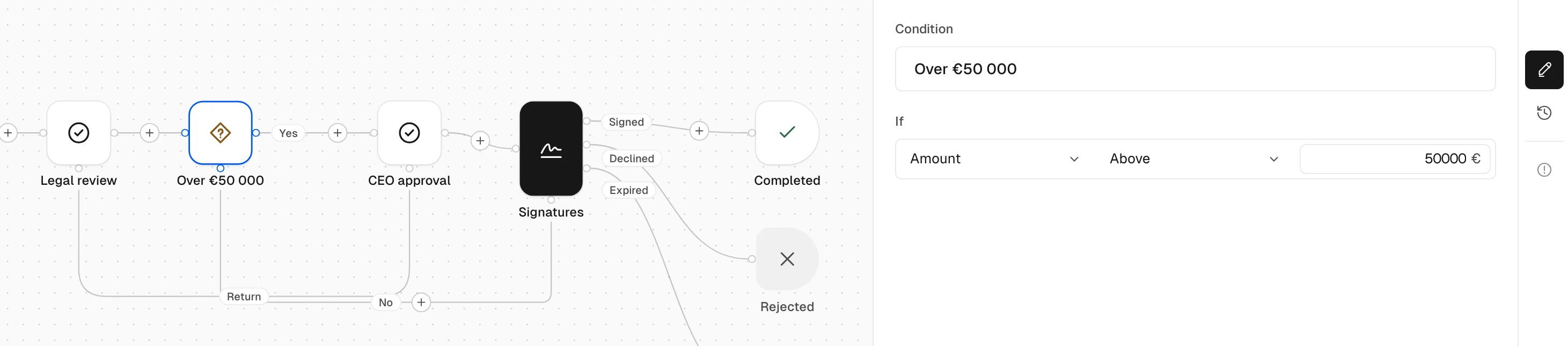
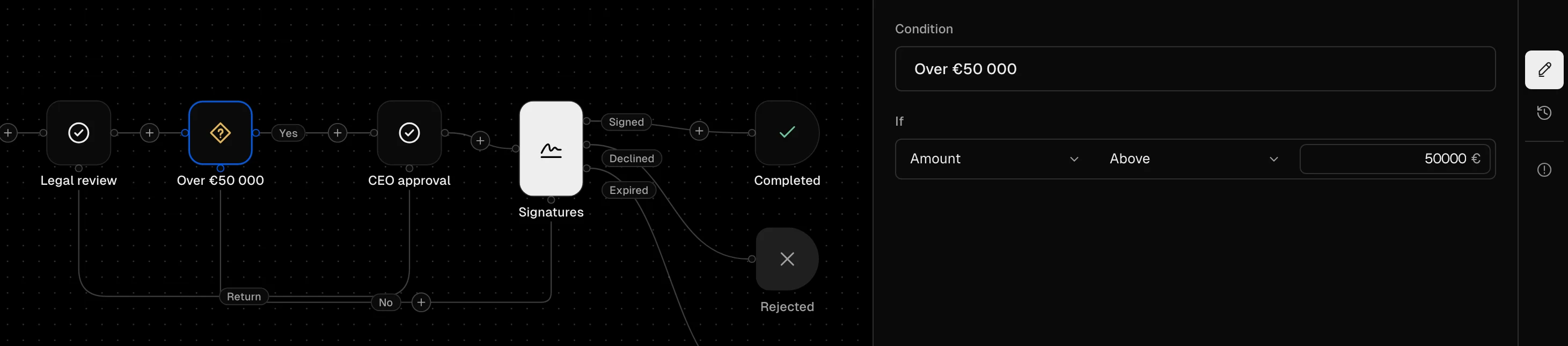
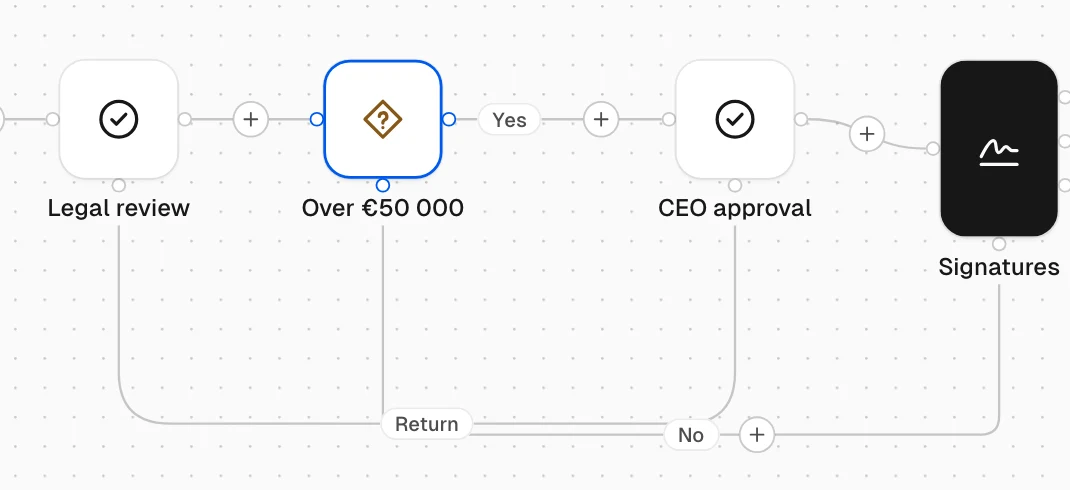
"Over €50 000" sends large contracts on to CEO approval. You can test the amount, the partner, the document type or a tag.
No skips ahead
A contract under the limit skips CEO approval and goes straight to Signatures. Nobody has to remember the threshold.
Return for changes
CEO approval can send the contract back to Legal review. A line drawn as Return shows where a returned case goes; Postpone parks it for later.
To fix before you activate
The editor lists every problem in the route under To fix, such as a loop with no person in it and no repeat limit. Once the list is empty, you can activate the route.
Other ways a route can split
Decision
A person picks an outcome you named, and each outcome is a branch.
Parallel branches
Two lanes run at once and meet again at the join.
Everyone in a role
The step waits until every person in the role has answered.
Identity check
A failed check goes wherever you send it.
One contract through the route, step by step
Move a service agreement through the route above and watch what three people see in their Tasks. Switch the contract value to see the condition take the other branch.
Started
Now: Legal review / any one of LegalNext: CEO approval
- Alex MorganContract manager, started the case
- My turn
- For my role
- Waiting on others
- Done
Legal reviewWaiting for Legal - Ana RuizLegal
- My turn
- For my role
- Waiting on others
- Done
Legal reviewAny one of Legal can take itTake it - Mira ChenCEO
- My turn
- For my role
- Waiting on others
- Done
Nothing here for this case
Alex chose Start a workflow… on the document. The case starts, and the Legal review lands with the whole Legal role.
Legal review
Now: Legal review / Ana RuizNext: CEO approval
- Alex MorganContract manager, started the case
- My turn
- For my role
- Waiting on others
- Done
Legal reviewWaiting for Ana Ruiz - Ana RuizLegal
- My turn
- For my role
- Waiting on others
- Done
Legal reviewApprove, return or reject - Mira ChenCEO
- My turn
- For my role
- Waiting on others
- Done
Nothing here for this case
Ana took it, so it left For my role for everyone else in Legal and moved to her My turn.
CEO approval
Now: CEO approval / Mira ChenNext: Signatures
- Alex MorganContract manager, started the case
- My turn
- For my role
- Waiting on others
- Done
CEO approvalWaiting for Mira Chen - Ana RuizLegal
- My turn
- For my role
- Waiting on others
- Done
Legal reviewApproved - Mira ChenCEO
- My turn
- For my role
- Waiting on others
- Done
CEO approvalApprove, return or reject
€62 000 is over €50 000, so the condition sends the case on to Mira.
Signatures
Now: Signatures / Signed 1 of 2Next: The last step
- Alex MorganContract manager, started the case
- My turn
- For my role
- Waiting on others
- Done
SignaturesSign as Contract manager - Ana RuizLegal
- My turn
- For my role
- Waiting on others
- Done
Legal reviewApproved - Mira ChenCEO
- My turn
- For my role
- Waiting on others
- Done
CEO approvalApproved
The Signing step created the signature request. Lumen Labs signs from it in the usual way.
Completed
- Alex MorganContract manager, started the case
- My turn
- For my role
- Waiting on others
- Done
SignaturesSigned - Ana RuizLegal
- My turn
- For my role
- Waiting on others
- Done
Legal reviewApproved - Mira ChenCEO
- My turn
- For my role
- Waiting on others
- Done
CEO approvalApproved
The case is closed. Its journal holds every step above, and anyone allowed can download Case data.pdf and Journal.pdf.
Started
Now: Legal review / any one of LegalNext: Signatures
- Alex MorganContract manager, started the case
- My turn
- For my role
- Waiting on others
- Done
Legal reviewWaiting for Legal - Ana RuizLegal
- My turn
- For my role
- Waiting on others
- Done
Legal reviewAny one of Legal can take itTake it - Mira ChenCEO
- My turn
- For my role
- Waiting on others
- Done
Nothing here for this case
Same start. The route already knows the amount.
Legal review
Now: Legal review / Ana RuizNext: Signatures
- Alex MorganContract manager, started the case
- My turn
- For my role
- Waiting on others
- Done
Legal reviewWaiting for Ana Ruiz - Ana RuizLegal
- My turn
- For my role
- Waiting on others
- Done
Legal reviewApprove, return or reject - Mira ChenCEO
- My turn
- For my role
- Waiting on others
- Done
Nothing here for this case
Ana took it from the role.
Signatures
Now: Signatures / Signed 1 of 2Next: The last step
- Alex MorganContract manager, started the case
- My turn
- For my role
- Waiting on others
- Done
SignaturesSign as Contract manager - Ana RuizLegal
- My turn
- For my role
- Waiting on others
- Done
Legal reviewApproved - Mira ChenCEO
- My turn
- For my role
- Waiting on others
- Done
Nothing here for this case
€42 000 is under the limit, so CEO approval is skipped and Mira is never asked.
Completed
- Alex MorganContract manager, started the case
- My turn
- For my role
- Waiting on others
- Done
SignaturesSigned - Ana RuizLegal
- My turn
- For my role
- Waiting on others
- Done
Legal reviewApproved - Mira ChenCEO
- My turn
- For my role
- Waiting on others
- Done
Nothing here for this case
Closed with one approval fewer; Mira was never asked.
An example route, built for this page. Names and amounts are sample data.
Approvers inside and outside your workspace
Give each step to the people who should act on it. Everyone sees their part in one Tasks list with four tabs: My turn, For my role, Waiting on others and Done.


Named people
Put one or more colleagues on the step by name. The task goes straight to their My turn.
Any one of a role
The task waits in For my role for everyone in the role. The first person to press Take it owns it, and can release it if they cannot finish. If nobody takes it in time, the step's escalation tells the people you chose.
Everyone in a role
Each person in the role has to act before the route moves on. Use it when every reviewer's answer matters.
Someone outside the workspace
A client, a partner or an auditor can take one step. They get an email saying what your workspace asks of them, sign in to their own Chaindoc account (creating one is free) and find the work on their own Tasks page. They see your workspace's name, what is asked of them and their own part, nothing else.
- Signs in to their own account
- Sees only their part
- Takes no seat
Roles come from your workspace settings. See user roles and permissions for who can build and start workflows.
A journal for every case
Every case keeps a journal of what happened: who started it, who took each step, what they decided and when. Every entry carries the hash of the one before it, so a changed entry breaks the chain and the journal says where.
- Download Case data.pdf and Journal.pdf from the case, or later from Storage
- Replacing a participant needs a reason, and the reason goes into the journal
- Only people the workflow allows can see a case and its files
The journal stays in Chaindoc. The signed document gets its own audit trail and on-chain record, as every Chaindoc signature does.
Chaindoc does not claim that a journal meets any particular audit standard; it gives you the entries and the files.

Contract approval software for legal, sales and procurement
Three routes we see often. None of them ships ready-made: you build your own, or duplicate one of yours and change it.
Contract approval before signing
Legal reads every contract, the CEO approves the large ones, then both sides sign.
- DocumentWay in
- Approval stepany one of Legal
- Conditionover €50 000
- Approval stepCEO; skipped when No
- Signing stepboth sides
Supplier agreement with checks
Procurement fills in the supplier's details, Finance checks the figures, the Head of Procurement approves, then the agreement goes for signatures.
- DocumentWay in
- Formany one of Procurement
- Check stepany one of Finance
- Approval stepHead of Procurement
- Signing stepboth sides
Deal desk with parallel review
Legal and Finance review a sales contract at the same time; the sales lead approves once both are done.
- DocumentWay in
- Parallel branchesLegal / Finance, everyone in each role
- Approval stepsales lead
- Signing stepboth sides
A case can also start from your own system over the API, with a key limited to Workflows. See start a workflow from your system.
Change a route without stopping the cases in it
A route changes mid-quarter more often than you expect, and workflow approval software has to cope with it. Edit the route as a draft and press Activate when it is ready. New cases take the new version; cases already running finish on the version they started with.
v1
Past2 running cases finish here
v2
ActiveNew cases start here
v3
DraftNot used until you activate it
Who can start
Name the people or roles allowed to start each workflow. Nobody gets access automatically.
Who can do what
Decide who may share or correct case data, and who may view, download or share case files. Case visibility is set separately, so a private case stays with its participants.
Deadlines and reminders
Give each case a deadline and each approval or check step its own reminders. People with the right permission can send a reminder by hand, extend a deadline or replace a participant.
Business
€29 per seat a month, or €278 per seat a year
- Unlimited workflows
- People outside the workspace take no seat
- Chaindoc Workflows is the approval management part of Chaindoc, next to your documents, signatures and invoices
On a lower plan, workflows stay readable. Losing the plan cancels cases still running; finished ones keep their signatures.
See plans and pricingCan I route a contract through several approvers in a set order before it goes out for e-signature?
Yes. Put the approval steps in the order you want and a Signing step after them. The signature request is created only when the case reaches that step, and the document's content is locked while the workflow holds it.
Can people approve at the same time, or does each wait for the one before?
Both. Steps one after another wait for each other. Parallel branches run two lanes at the same time and join when both are done. Inside one step, "Everyone in a role" waits for every person in the role, while "Any one" moves on after the first answer.
Can the route change by contract value, department or document type?
A Condition step reads the amount, the partner, the document type or a tag, and sends the case on or skips ahead. Departments are handled through roles: give the step to the role of that department, such as Legal or Finance.
Can approval be required before signature and payment?
Yes for signature: the Signing step comes after the approvals, so nothing goes out for signature unapproved. Payment follows the contract's own payment terms, set on the contract.
Can clients or vendors approve without creating an account?
No. Someone outside your workspace gets an email, signs in to their own Chaindoc account and finds the task on their own Tasks page. Creating that account is free, and they take no seat in your workspace. They see only what is asked of them.
What happens if an approver doesn't respond?
Each step people act on can have a deadline and an escalation, and approval and check steps can send reminders. A task given to a role can be taken by anyone in it, and if nobody takes it in time the escalation tells the people you chose. With the right permission you can send a reminder, extend the deadline or replace the participant; a replacement needs a reason, which goes into the journal.
Who approved what and when, and can I show it to an auditor?
Each case keeps a journal of every step, decision and person, and every entry carries the hash of the one before it. Download it as Journal.pdf, with the case's values in Case data.pdf. The signed document has its own audit trail as well.
How much does it cost if approvers only review occasionally?
Workflows are part of the Business plan: €29 per seat a month, or €278 per seat a year, with unlimited workflows. People outside your workspace who take a step take no seat. See pricing.
Guides on contract approval and records



Build your first approval workflow
Approval workflow software on the Business plan: draw the route, activate it and send the next contract through it.