Product Releases
Document workflow automation: how it works and how to set it up in Chaindoc
Document workflow automation routes drafts through approval, signing and payment by rule. Learn the five setup steps and what Chaindoc's new plans change.


Sign a document and check the record yourself.
Start nowWhat is document workflow automation?
Document workflow automation is the practice of moving a document from draft to approval, signature and payment by rules you set once, instead of by someone forwarding an email. The rules decide who reviews what, which checks run before anyone signs, and what happens after the last signature.
Contracts rarely stall at the signature itself; the delays sit in the handoffs around it. Sales drafts an order form in Word, legal reviews an attachment that's already out of date, compliance chases an ID scan in another portal, and finance hears about custom payment terms only after the client has signed.
Those handoffs cost real money. According to the World Commerce & Contracting benchmark from August 2025, poor contract handling costs an average of 8.6% of contract value, which is €8,600 on a €100,000 deal, and above 15% on complex engagements. High performers in the same study close contract cycles nearly four times faster.
This guide walks through the setup in five steps. Then it covers what Chaindoc's November 2026 release changes: no monthly cap on signatures or contracts on any paid plan, one list for every document, and visual Workflows on Business and Enterprise.
Already on Chaindoc?
There's nothing to migrate. Your documents, contracts, templates and blockchain proofs are in the new Documents list. Personal is now called Pro and signs without a monthly cap. Team and Business no longer cap signatures or contracts either; Business has no seat ceiling, and Team adds up to 10 seats on top of the owner's. Packs you've already bought stay valid until the end of the period you paid for.
How to set up document workflow automation in five steps
Write the route down before you configure anything. Any system is easier to set up once you know who does what.
- 1.Map the route you run today. Note who drafts, who approves, who signs and who invoices, and where each handoff happens. Usually it's an email thread.
- 2.Turn exceptions into rules. Most routes run straight until money or risk changes them: a purchase above €25,000 needs finance sign-off, a non-standard clause goes to legal, a rejected draft goes back to its author with a reason.
- 3.Pick the identity level for each document type. An email code is enough for most agreements. Add an ID-and-selfie check for high-stakes ones, and use a qualified electronic signature (QES) where the law asks for that form.
- 4.Attach the money to the agreement. Payment terms written into the contract let billing follow the signature, instead of waiting until someone remembers to tell finance.
- 5.Publish the route as a version and keep the record. Sooner or later you'll need to show who approved what, when, and under which version of the rules.
What this looks like in Chaindoc Workflows
On Business and Enterprise, routes live in Settings > Workflows. You draw each one on a canvas: a form, a document or an API call starts a case, people approve or reject, conditions branch on values such as an amount, and every path ends in an outcome like won, lost or completed.
A step can require every holder of a role to approve, or let the first free reviewer take it from a shared pool. Parallel branches run at the same time. Before you activate a new version, Chaindoc flags steps that can't be reached and steps without a deadline. You can also describe the policy in plain English to the built-in Assistant and keep or discard the changes it proposes.
Edits save to a draft automatically. Cases already running stay on the version they started under, and only new cases pick up a version once you activate it. People work from Tasks in the sidebar, outside participants sign in to a free Chaindoc account and see only their own step, and authorized roles can export the case data and a hash-chained journal as PDFs.
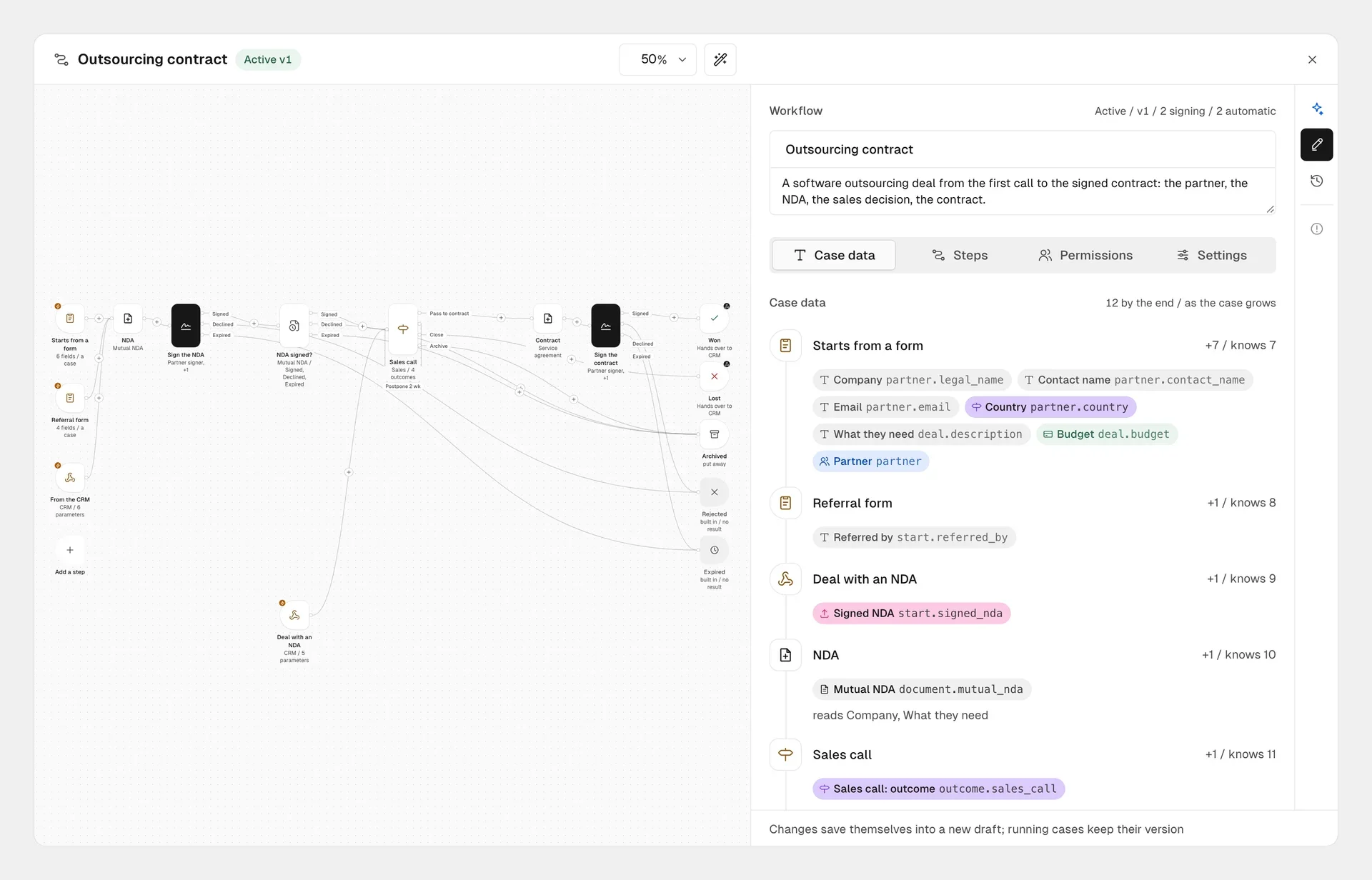
The Workflows canvas on Business and Enterprise: an intake form, NDA signing, a branch on the sales outcome, contract generation and typed case data.
Unlimited signatures and contracts on Pro, Team and Business
Per-envelope pricing breaks document workflow automation as soon as volume grows. When every send counts against a monthly allowance, department leads ration them, skip internal sign-offs or push small vendor forms back to email.
Until this release, Chaindoc's paid plans worked that way too: signatures had a monthly cap, and extra capacity came in signature and contract packs. Now the personal plan is called Pro (€9 a month, or €86 a year) and signs without a cap. Team (€19 per seat a month, or €182 per seat a year) and Business (€29 per seat a month, or €278 per seat a year) don't cap signatures or contracts either.
Seats are the one place the two team plans differ on volume. Team adds up to 10 seats on top of the owner's, and Business has no seat ceiling. You pay for each seat you add, while Viewers take no seat at all. Beyond that, the Chaindoc plans now differ by storage, identity checks, AI budget, the API and Workflows.
Chaindoc plans and limits from November 2026
| Free | Pro | Team | Business | Enterprise | |
|---|---|---|---|---|---|
Price | €0 | €9 a month | €19 per seat a month | €29 per seat a month | Agreed with sales |
Signatures | 5 a month | Unlimited | Unlimited | Unlimited | Unlimited |
Contracts | 1 a month | Unlimited | Unlimited | Unlimited | Unlimited |
Seats | 1 | 1 | Owner + up to 10 | No ceiling | No ceiling |
Storage | 100 MB | 1 GB | 10 GB | 100 GB | Agreed |
KYC checks | None | 1 a month | 5 a month | 10 a month | Agreed |
AI Composer | 2,000 CU | 10,000 CU | 20,000 CU per seat | 30,000 CU per seat | Agreed |
Custom roles | None | None | Up to 3 | Unlimited | Unlimited |
Workflows | View existing only | View existing only | View existing only | Included | Included |
API, webhooks, SDKs, MCP | No | No | No | Included | Included |
Single sign-on | No | No | No | No | Included |
No more signature or contract packs
Packs are gone because Pro, Team and Business no longer cap signatures or contracts. What's still metered can be topped up without changing plans: €1.99 for each extra Sumsub KYC check, €2.00 for each extra 10,000 CU of AI, and €0.90 for each extra GB of storage.
Start free, then drop the caps
Free includes 5 signatures a month and needs no card. Pro, Team and Business sign without a monthly cap, and Business adds Workflows and the API.
One Documents list and Home boards for each role
Earlier versions of Chaindoc kept signature requests, signed files and contracts in separate menus, so an operations lead had to click through three screens to see what needed attention today. Now plain files, signature requests, contracts, incoming partner agreements and amendments share one filterable Documents list, the core of contract management in the new workspace. Each row carries one of 13 statuses grouped as in progress, in effect, and stopped or closed, and a Sign button appears whenever the next move is yours.
Home is now a board you build instead of a fixed summary. On Team and Business you can keep as many shared and personal boards as you need, built from 24 live blocks in six sizes. Finance usually pins unpaid invoices, revenue and partner debts side by side. Legal and operations prefer what's waiting for them, running cases, documents by status and expiring contracts. Blocks a member's role isn't allowed to see, such as billing totals, stay hidden.
The Create button in the top bar follows the page you're on. On Invoices it starts a new invoice, on Bills it sends a billing request, and on Verifications it checks a document.
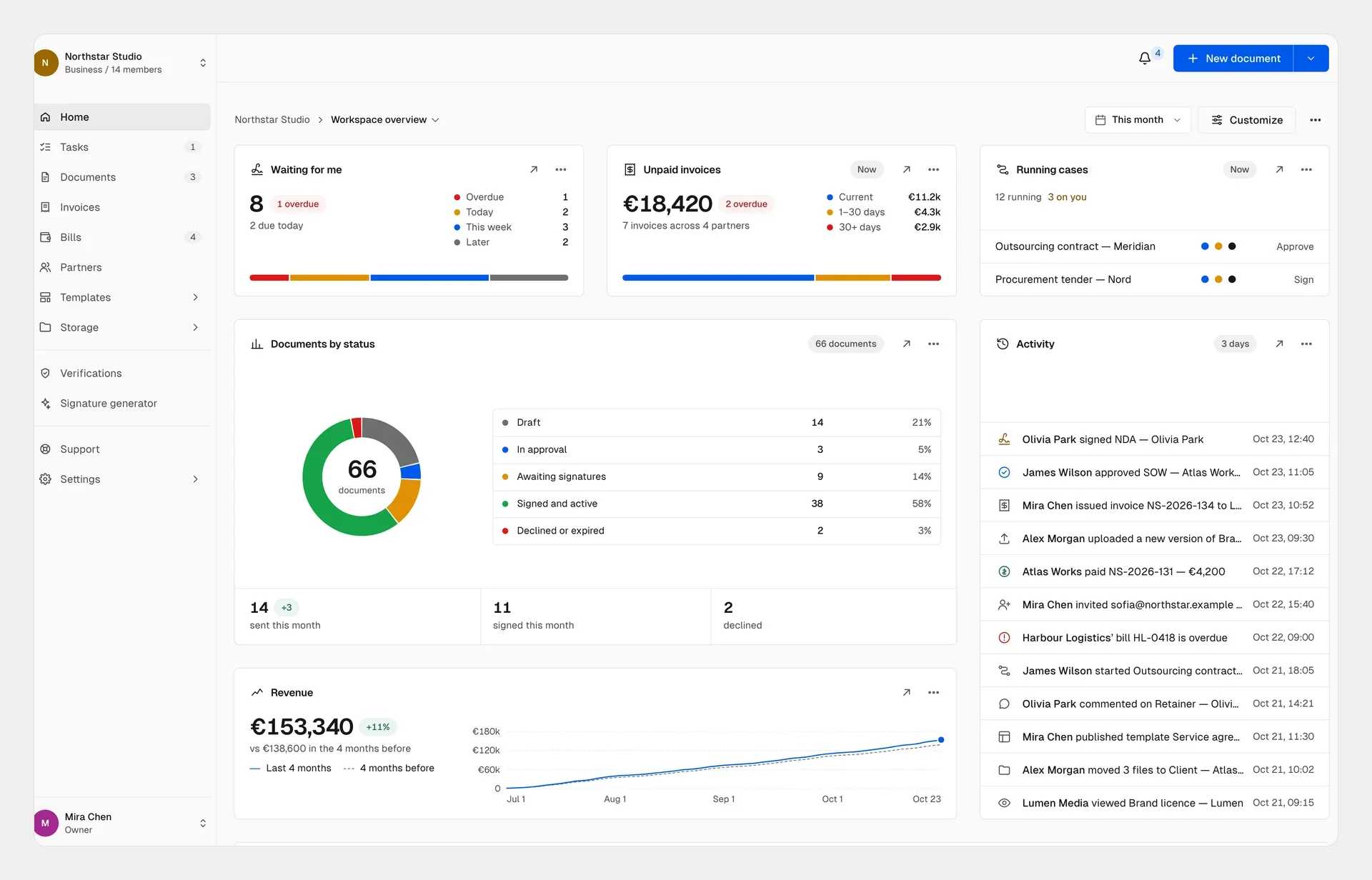
A Home board that mixes running workflow cases, signing status, overdue invoices and revenue.
From uploaded file to paid invoice
In the new editor you can upload a PDF, Word, OpenDocument, RTF, TXT or Markdown file, or a PNG, JPEG or WebP image, up to 20 MB and 50 pages, and Chaindoc converts it with AI into an editable document. Notes on the conversion appear in the side panel, in English, so you can check the layout against the source.
The document window keeps everything about the agreement in 11 tabs, including versions, signatures, payment terms, invoices, amendments, permissions and comments. You can place signature, initials, date, text and checkbox fields right in the text, and rename a document even after you've sent it.
Older agreements come in through Signed outside Chaindoc. Upload a PDF signed on paper or in another tool, and Chaindoc reads it, counts the signatures it finds and pre-fills the signers and the signing date for you to confirm. It doesn't validate those signatures, so run the file through Verifications if you need that.
Payment terms turn an agreement into something finance can act on. With contract-linked payments you can set a one-time fee, an upfront deposit or a recurring series from weekly to yearly, paid by card, SEPA Direct Debit, Bacs Direct Debit, ACH or bank transfer. The counterparty approves any change to a recurring schedule, and our guide to billing after e-signature walks through the setup. Two sidebar sections cover the rest: Bills for incoming supplier invoices and billing requests, and Partners for every client and supplier with their agreements, invoices and overdue balances.
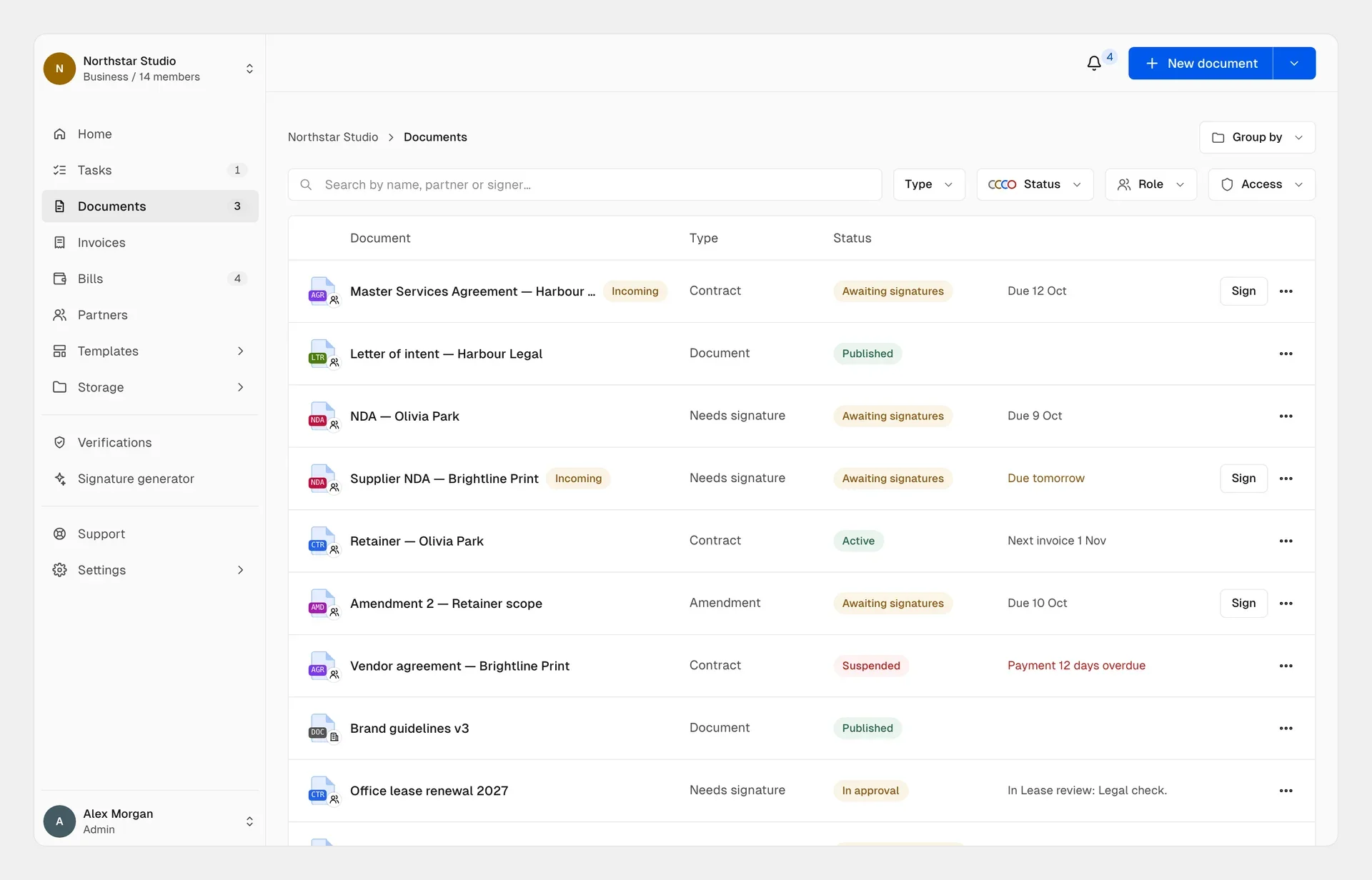
One Documents list tracks drafts, contracts, amendments, workflow approvals and overdue invoices.
What shipped in the November 2026 release
| Area | What's new | Who it helps most |
|---|---|---|
Home and navigation | 24 live blocks, shared and personal boards, a Create button that follows the page | Ops, legal and finance leads who want their own daily view |
Documents and editor | One list for files, requests, contracts and amendments; AI conversion of uploaded files; import of agreements signed elsewhere | Teams moving old PDFs into one register |
Workflows and Tasks | Visual routes with conditions and parallel approvals, an AI Assistant, typed workflow data, case data and journal PDFs | Procurement, legal review and client onboarding |
Invoices, Bills and Partners | Recurring billing with counterparty approval, credit notes, incoming bills, VIES VAT checks | Finance teams tying collection to signed terms |
Roles, API and MCP | Custom roles, a Permissions tab on every document, REST API, webhooks for document and workflow events, Embed and Server SDKs, MCP server | Developers embedding signing in a CRM or letting AI agents run agreements |
Signer identity, QES and blockchain proof
If a signature is disputed years later, the evidence has to show who signed, that they meant to, and that the file hasn't changed since. That holds under the EU eIDAS Regulation (EU) No 910/2014, as amended by Regulation (EU) 2024/1183, and under the UK Electronic Communications Act 2000. Deals with US parties fall under the ESIGN Act and UETA, which ask much the same.
Chaindoc answers the first question with checks you switch on per document. Signers open a document with a 6-digit code sent to their email, so nobody needs a password. For high-stakes agreements the sender can require a Sumsub KYC identity check, an ID document plus a selfie, before the document opens. Where the law asks for a qualified electronic signature, signers can sign with their own qualified certificate from a .p12 or .pfx file, or with a smart card through Web eID, and the private key never leaves their browser.
The second question is about the file. Platform signatures are PAdES signatures made with ECDSA P-256 keys. Chaindoc also anchors a hash of each published version on the SKALE Calypso network, and the signers' proofs once signing completes, so any later change to the file shows up; our SKALE timestamp explainer covers the details. To check a signed file, upload a PDF, XML, P7M, P7S or ASiC container of up to 50 MB to Verifications in the app. It validates PAdES, XAdES, CAdES and ASiC signatures against the EU Trusted List and keeps the PDF report in your workspace. For a single PDF there's also the free PDF signature checker.
Chaindoc is certified to ISO 27001 and ISO 9001. One caution before you pick a signature level: some documents still need a specific form, such as a notarised deed, and no e-signature replaces that.
What goes on chain, and what Chaindoc isn't
Chaindoc isn't a Qualified Trust Service Provider and never holds your qualified key. In the QES lane, your own certificate signs in your browser, and the EU's DSS library checks its qualified status against the EU Trusted List. SKALE transactions carry only hashes and signature proofs, never names, emails, KYC scans or contract text.
When to choose Team, Business or Enterprise
Pick a plan by how your documents start and how your company controls access. Chaindoc doesn't replace your ERP or your word processor: keep three-way invoice matching in the ERP and live co-editing in your editor, then bring the agreed draft in.
Team suits groups of up to 11 people, the owner plus ten seats, who create agreements from templates, comment on drafts and need roles and permissions with up to three custom roles, plus priority support. Business has no seat ceiling and adds Workflows, unlimited custom roles, the REST API and webhooks, Embed and Server SDKs, the Chaindoc MCP server for AI agents, and priority support with an SLA.
Enterprise is Business with single sign-on through your identity provider, such as Microsoft Entra ID, Google Workspace or Okta, on verified company domains, plus allowances and terms agreed with sales. Whatever the plan, every document keeps its audit trail.
Start on Free with 5 signatures a month and no card, compare the plans, or talk to us about Enterprise.
Sources
Checked on 17 November 2026:
- 1.World Commerce & Contracting, Contract Management Whitepaper, August 2025: 8.6% average loss of contract value and a nearly 4x cycle-time gap.
- 2.European Union, Regulation (EU) No 910/2014 (eIDAS) and Regulation (EU) 2024/1183.
- 3.United Kingdom, Electronic Communications Act 2000.
- 4.United States, ESIGN Act, 15 U.S.C. Chapter 96.
Frequently Asked Questions
Answers to popular questions about Chaindoc and secure document workflows.
Signatures and contracts, yes: Pro, Team and Business have no monthly cap on either. Seats differ. Team adds up to 10 seats on top of the owner's, at €19 per seat a month, while Business has no seat ceiling, at €29 per seat a month. On both plans you pay for each seat you add, and Viewers and external signers take no seat. The two plans also differ in storage (10 GB against 100 GB), monthly identity checks (5 against 10), AI budget, and access to the API and Workflows.
Business and Enterprise. Both get the full Workflows editor: visual routes, conditions, parallel approvals, typed workflow data, the Tasks inbox and the AI Assistant. Below Business a workspace can't build or run workflows, and if it moves down from Business, the workflows it already made stay visible in read-only mode. Enterprise has the same Workflows as Business and adds single sign-on through your identity provider, plus allowances and terms agreed with sales.
They keep going on the version they started under. Every edit on the canvas, whether you make it or the Assistant proposes it, saves to a draft and is checked for problems such as steps that can't be reached or steps without a deadline. Nothing changes for live cases until you activate the new version, and even then only new cases use it. So a contract halfway through legal review isn't rerouted mid-step because someone changed the rules.
No. Clients, suppliers and other outside signers never take a seat and don't need a subscription. A signer confirms their email with a 6-digit code and signs. An outside participant in a workflow signs in to a free Chaindoc account with an emailed code and sees only the step assigned to them, never your workspace. Inside your own team, Viewers who only need to read documents don't take a seat either.
Yes. Choose Signed outside Chaindoc and upload the PDF, up to 50 MB, whether it was signed on paper or in another e-signature tool. Chaindoc reads the file, counts the signatures it finds and pre-fills the signers and signing date for you to check. It doesn't validate those signatures, so run the file through Verifications if you need that. Once it's in, you can track renewals and amendments and bill against the agreement like any other contract.
More e-signature and blockchain guides
Practical guides on electronic signatures, blockchain audit trails, and secure document management — handpicked to build on what you just read.