Signature Ideas: How to Design a Signature You'll Actually Use
Signature ideas that survive real documents: five styles compared, a six-step method to design your own, and the point where a signature image stops counting.

Sign a document and check the record yourself.
Start nowSignature ideas that actually work
A signature is a small piece of design you have to reproduce from memory tens of thousands of times, which is exactly why most galleries of signature ideas are useless.
Most signature ideas galleries hand you 250 calligraphy flourishes and stop there. Pretty. Useless.
You'll write your name tens of thousands of times over a working life, usually in a hurry, usually with someone else's pen, often against a clipboard on a doorstep. A signature that only comes out right when you're concentrating isn't a signature. It's a drawing you happen to be good at.
So start from the constraint instead of the aesthetic. A usable signature has to do two things that pull against each other. It has to come out roughly the same way every time, even when you're not paying attention. And it has to be hard for a stranger to reproduce after seeing it once.
Speed helps with both. Fast writing produces rhythm, pressure changes and connecting strokes that a copyist has to consciously fake, and conscious faking looks different under a magnifier. Slow, careful, decorative signatures are the easiest ones in the world to trace.
That narrows the field to five style families worth your time:
- Full name, joined. Every letter connected, first name flowing into surname. Legible, formal, slow. Banks and notaries like it.
- Initials plus surname. The office default, and for good reason: it's quick, it stays readable at small sizes, and it survives being squeezed into a signature box.
- Monogram. Two or three initials locked into a single mark. Compact, distinctive, and terrible on any form that expects to see your surname.
- The anchored scrawl. One clearly formed letter, usually the capital, then a controlled illegible run. This is what most professionals converge on after a decade of signing things.
- Print and underline. Block capitals with a single sweeping stroke beneath. Honest, plain, and the weakest of the five against forgery.
My own opinion, for what it's worth: the anchored scrawl wins for most people, and the monogram is the one people regret. It looks great on a business card and causes arguments at car rental desks.
Five signature styles and what each one trades away
| Style | How long it takes | How hard to copy | Holds up at small sizes | Where it fits |
|---|---|---|---|---|
Full name, joined | 3 to 5 seconds | Moderate | Poorly, it crushes | Deeds, mortgages, notarised papers |
Initials plus surname | 2 seconds | Moderate | Well | Everyday business, most contracts |
Monogram | Under 2 seconds | Easy to trace | Very well | Creative work, personal branding |
Anchored scrawl | 1 to 2 seconds | Hard | Well | High-volume signing, approvals |
Print and underline | 4 to 6 seconds | Very easy | Well | Forms, witness lines, delivery slips |
How to design a signature, step by step
This takes about twenty minutes and one sheet of paper. Don't do it on a screen. Screens lie about how a pen behaves.
- 1.Write your name normally, twenty times, fast. Fill the sheet. Don't try to make it nice. What you're collecting is evidence about your natural hand, and the twentieth attempt is more honest than the first.
- 2.Circle the letters that came out the same every time. There are usually two or three, and they're almost always the capitals plus one loop somewhere in the surname. Those are your anchors. Everything else is negotiable.
- 3.Decide how much of your name has to stay readable. Full surname, first initial, or just a shape? This is the one real decision in the process, and it's driven by where you sign rather than by taste. Sign a lot of internal approvals and you want speed. Sign property documents and you want a name a stranger can read.
- 4.Build the connection. Take your anchors and find the single stroke that gets from one to the next without lifting the pen. This is the part that takes the longest, and it's the part that makes the signature yours. Lifting the pen mid-signature is the most common mistake here: every lift is a place where a forger gets to restart.
- 5.Add one closing stroke, and only one. An underline, a crossbar, a tail that loops back. Two flourishes look like effort. One looks like habit.
- 6.Sign the sheet forty times. If you can't do it fast, it's too complicated, and you'll simplify it involuntarily within a month anyway. Better to simplify it now on purpose.
One practical note: test it in a signature box that's about 5 cm wide. Half of the designs that look brilliant on blank paper collapse the second they're constrained, which is exactly what happens on every delivery slip and every touchscreen you'll ever meet.
If you change your signature, the version on file matters more than the version you like. Banks, notaries and land registries compare what you write against a specimen they hold, sometimes one you gave them years ago. Changing your everyday signature is free. Changing the one that has to match a specimen card means updating the specimen first, and until you do, expect to be asked to sign again.
Signature ideas for my name: work outward from the initials
When people search for signature ideas for my name, they're usually hoping someone has already solved their specific letters. Nobody has. But the letters do constrain the answer, and that's genuinely useful.
Capitals split into three behaviours. Some open outward and invite a long lead-in stroke: A, K, M, N, W. Some close into a loop that wants to become the whole signature: B, D, O, P, R, S. And some are essentially vertical sticks that need help: I, J, L, T.
So the practical approach depends on what you were given:
- An open capital first? Start with an oversized version of it and let the lead-in stroke carry across the rest of the name. Think of the capital as the frame and everything after it as texture.
- A loop capital? Enlarge the loop until it can enclose the following two or three letters. This produces the most recognisable signatures of the lot, and it's why so many well-known autographs start with S, B or D.
- A stick capital? Don't fight it. Pair it with the surname initial and treat the two together as your mark, because a lone L has nowhere to go.
Repeated letters between first name and surname are a gift. If both start with the same letter, or share a distinctive one, build the whole signature around that repetition and let it do the identifying work.
Here's the thing about the galleries though. Copying a signature you saw online is the one genuinely bad idea in this whole area. You'll write it slowly because it isn't in your muscle memory, and slow signatures are the forgeable ones. Steal the structure, not the strokes.
Cursive signature or print: which one actually holds up
A cursive signature is harder to forge than printed capitals, and the reason has almost nothing to do with how it looks.
Document examiners don't compare shapes first. They compare line quality: where the pen sped up, where pressure increased, where the ink pooled at a direction change, whether the stroke rhythm is consistent with someone writing from memory. A cursive signature written at speed produces dozens of those markers per second. Printed capitals produce very few, because printing is a series of separate deliberate strokes, and a forger's deliberate strokes look much the same as yours.
That said, cursive has a real cost. Handwriting instruction has been shrinking for two decades, and plenty of people under thirty simply don't have fluent joined-up writing available. Forcing it produces exactly the slow, hesitant line quality you were trying to avoid.
The compromise that works: cursive for the anchors, whatever comes naturally for the rest. One fluent connected capital, one fluent loop, and a fast run between them beats a fully joined signature you have to think about.
One more thing worth knowing. Legibility isn't a legal requirement in the EU, the UK or the US. What matters is that you made the mark intending to adopt the document, which is why an X still works in some contexts. Legibility is about convenience at the counter, not validity.
Try Your Design Before You Commit To It
Draw the signature you just sketched, or type your name and pick a handwriting style, then download it as a transparent PNG. It takes about a minute and costs nothing, which makes it a cheap way to see how a design behaves at the size a real document gives you.
Open the Signature GeneratorHow to turn a paper signature into a clean image
Once the design settles, you'll want a digital copy. The phone-photo-and-crop approach produces grey mush, so it's worth doing properly the first time.
What you need: unlined white paper and a black felt-tip or fineliner, not a ballpoint. Ballpoint ink is thin and breaks up the moment you threshold the image.
Sign it three or four times across the sheet, pick the cleanest one, then photograph it in daylight with the camera flat above the paper rather than at an angle. No flash. Flash creates a bright patch that ruins the contrast on one side of the stroke.
From there:
- Crop tight to the signature, leaving a couple of millimetres of margin.
- Convert to greyscale, then push the contrast until the paper goes pure white and the ink goes pure black. Most phone editors can do this with the brightness and contrast sliders alone.
- Remove the white background so the signature sits on transparency. A signature saved on a white rectangle will cover whatever text it lands on, which looks amateurish on any document with a signature line.
- Save as PNG. Never JPEG. JPEG compression puts grey halos around every stroke, and they show up badly against coloured document backgrounds.
If that sounds like more effort than you want, the signature generator does the whole thing in the browser: draw with a mouse, trackpad or finger, or type your name and choose a handwriting style, then download a transparent PNG. Our guide to free signature makers compares the options if you'd rather see what else is out there first.
Once you have the file, how to sign a PDF covers where to drop it on Mac, Windows, iOS and Android.
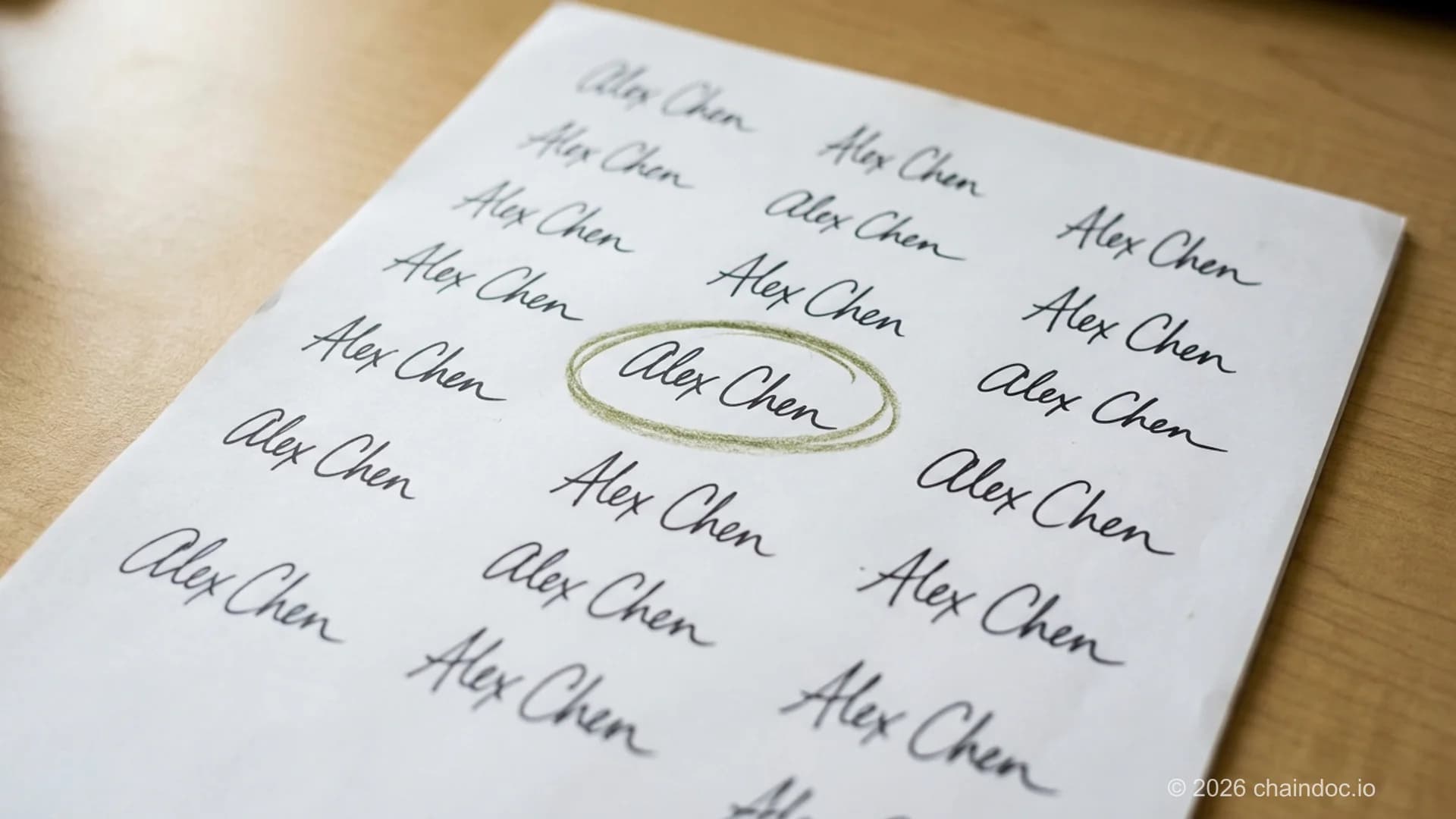
Twenty fast attempts tell you more about your natural hand than twenty careful ones. The anchors are the letters that survive all twenty.
Where a signature image stops being enough
Now the part the design guides skip.
A PNG of your signature dropped into a document is a legally recognised electronic signature in most places. Under Regulation (EU) 910/2014, article 3(10), an electronic signature is any data in electronic form attached to other data and used by the signatory to sign. A pasted image clears that bar. Under the US ESIGN Act and UETA, the test is intent: any symbol adopted with intent to sign counts, and courts have enforced pasted images on that basis.
So it's valid. The problem isn't validity. The problem is proof.
Article 26 of eIDAS describes what an advanced electronic signature adds: it's uniquely linked to the signatory, created with data under the signatory's sole control, and linked to the document so that any later change is detectable. A signature image gives you none of those. Anyone who has ever received a document you signed now owns a perfect copy of your signature, and there is nothing in the file that records who applied it, when, or whether the text above it was edited afterwards.
In a dispute, that gap does real damage. The other side says they never signed. You produce a document with their signature image on it. They point out, correctly, that the image proves nothing about who pasted it, and the burden lands back on you to reconstruct the story from emails and metadata. Only a qualified electronic signature carries the same legal effect as a handwritten one automatically, under article 25(2).
Germany makes the limit unusually explicit. Section 126 BGB requires an eigenhändige Unterschrift, signed by your own hand on the document, and a Faksimile stamp or scan doesn't satisfy it. Employment terminations under section 623 BGB and guarantees under section 766 BGB need wet ink and can't be signed electronically at all, not even with a qualified signature. If you sign anything German and formal, check which regime applies before you paste.
Our breakdown of digital signatures versus electronic signatures covers the mechanics, and the qualified electronic signature guide explains when you actually need the top tier.
According to Article 26 of Regulation (EU) 910/2014, the advanced tier is the first one that carries proof rather than just a picture. The instrument was adopted in 2014 and has applied across the EU since 2016. Primary sources worth reading directly: the consolidated eIDAS text on EUR-Lex, the European Commission's eSignature documentation, and, for the US side, the ESIGN Act of 2000 on GovInfo, which works alongside UETA from 1999.
What a signature image proves in a dispute
| Question you'll be asked | Pasted signature image | Signature with an audit trail |
|---|---|---|
Who applied this signature? | Unknowable from the file | Identity and authentication method recorded |
When was it applied? | Whatever the document says | Independent timestamp |
Was the text changed afterwards? | No way to tell | Any change breaks the signature |
Could someone else have used it? | Yes, anyone with the PNG | No, the signing event is tied to the signer |
Who has to prove what? | You do | The challenger does |
How to keep your signature from being copied
Your signature is a public mark. It's on parcels, credit card slips and every contract you've ever signed, so treating it as a secret is hopeless. Treating it as a low-value credential is realistic.
A few habits that genuinely reduce exposure:
- Don't post images of signed documents. Redact the signature before you share a contract screenshot, an invoice or a proof of address. This is the single biggest leak, and it's entirely avoidable.
- Keep the PNG out of shared drives. If your signature image sits in a folder five colleagues can read, five colleagues can sign as you.
- Vary what you use where. A quick mark for parcels, your full signature for anything with money or liability attached. Couriers don't need your best work.
- When a document matters, don't send a signature image at all. Send a signing request instead, so the record of who signed lives outside the file.
What can someone actually do with a copy? Less than people fear and more than they'd like. A signature alone rarely moves money, because banks compare it against a specimen and increasingly don't rely on it at all. Combined with a leaked ID document and an address, it's enough to attempt credit applications or forged authorisations, and that combination is what makes the redaction habit worth building.
Quick test for any document you're about to sign with an image: if it went wrong, would you want to prove in front of a third party who signed it and when? If yes, the image isn't the right tool, no matter how good the design is.
When the document actually matters
Two different problems get tangled together here, and separating them makes both easier.
Designing a signature is about you. Speed, consistency, something you're not embarrassed to write in front of a client. Spend the twenty minutes, get it into muscle memory, and generate a clean PNG for the hundred low-stakes places that just need a mark in a box.
Proving a signature is about everyone else. Contracts, NDAs, offer letters, anything where a year from now somebody might say that isn't my signature. Those need a record that lives outside the document: who authenticated, when, from where, and whether a single byte changed afterwards.
Chaindoc handles the second half. Every signature is bound to the document with an audit trail and a blockchain-anchored hash, so the check doesn't depend on anyone trusting your copy of the file. Your hand-designed signature still appears on the page, because people like seeing a signature. It just isn't the thing doing the legal work any more.
If you want to see what a real check looks like from the other side, validate a signed PDF and read the report. Our guide to verifying a signature in a PDF walks through what each verdict means, and if you're wondering how the mainstream services hold up, is DocuSign legally binding answers the question directly.
Sign It So It Holds Up
Draw or upload your signature once, then use it on documents that carry an audit trail: identity of every signer, a timestamp, and a hash anchored on-chain so any later edit is detectable. Free to start, no card, and the signature you designed still looks like yours on the page.
Start Signing With ChaindocFrequently Asked Questions
Answers to popular questions about Chaindoc and secure document workflows.
Write your name fast twenty times on one sheet, then look for the two or three letters that came out identically every time. Those are your anchors, and they're already unique to you. Build a single connected stroke that links them, add one closing flourish, and practise it forty times until it's automatic. Uniqueness comes from your natural hand, not from decoration you added on purpose.
One you can produce in under two seconds without thinking. If your first initial is an open letter like A, M or W, lead with an oversized version of it. If it's a loop letter like S, B or D, enlarge the loop until it wraps the letters that follow.
The ones that hold up in practice share a shape: one clearly formed capital, a fast illegible run, and a single closing stroke. Look at how executives and doctors sign after years of high volume and you'll see the same structure over and over. It survives speed, small boxes and bad pens, which is more than most decorative designs manage.
Beauty and function point in opposite directions here, which is worth knowing before you invest in flourishes. The signatures people call beautiful are usually slow, symmetrical and consistent in stroke width, and every one of those qualities makes a signature easier to trace. If you want something beautiful, keep it for cards and inscriptions and use a faster mark for documents.
It doesn't have to be. No major jurisdiction requires a legible signature: what matters is that you made the mark intending to adopt the document, which is why an X or a thumbprint still works in some settings. Legibility helps at counters where a clerk compares your signature against an ID, and it helps on documents that might be read by someone who has never met you. A middle position works for most people: keep the surname initial clearly formed and let the rest run.
More e-signature and blockchain guides
Practical guides on electronic signatures, blockchain audit trails, and secure document management — handpicked to build on what you just read.