Electronic Signature App: The Ultimate Guide to Signing Documents on the Go
Learn how an electronic signature app helps you sign documents securely on mobile, automate workflows, and maintain legal compliance with verifiable audit trails.

Introduction
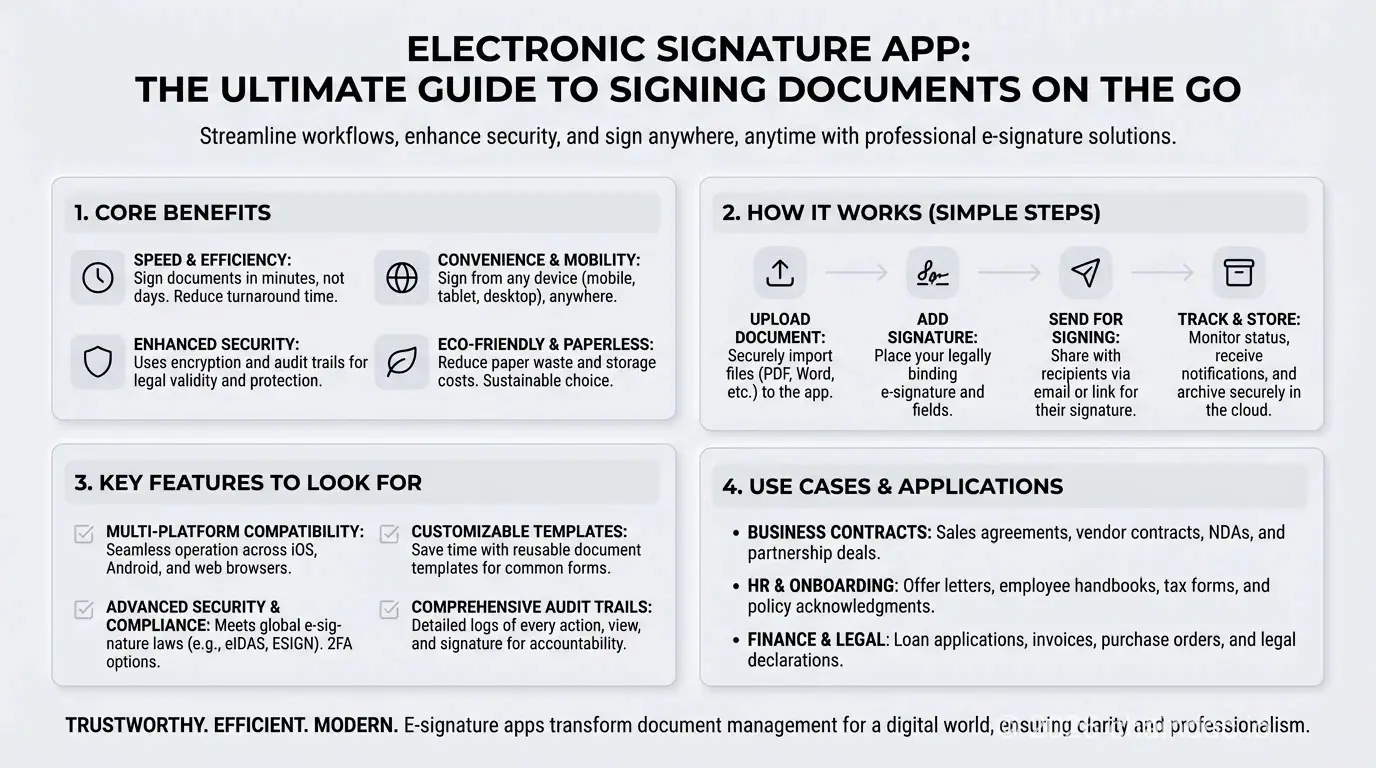
An electronic signature app turns any smartphone into a complete signing station, letting you sign PDF documents, contracts, and NDAs in minutes rather than days, from anywhere in the world. The old system of printing, signing, and scanning paper-based documents isn't just inefficient. It's a bottleneck that slows business and creates unnecessary risk. Every critical agreement delayed by courier or scanner is an opportunity lost. Remote signing has replaced wet signature workflows across every major industry, and the right app is the foundation of that shift.
Here's the thing: the numbers tell a compelling story. Aberdeen Group research shows organizations using electronic signatures complete contracts 83% faster and reduce operational costs by 37% (source). Forrester benchmarks $21.50 saved per e-signed transaction, with some services delivering up to 519% three-year ROI (source). This guide covers everything you need to make a confident choice: how mobile document signing works, what security features are non-negotiable, how to sign a PDF on your phone step by step, and how top services compare. For specific scan-sign-send workflows on the go, see our mobile e-signature app guide. Whether you're a freelancer closing a single deal or an enterprise managing thousands of contracts, you'll leave knowing exactly what to look for.
If you're evaluating services more broadly, our digital signature software buyer's guide provides a complete evaluation framework. For free options, see our free e-signature guide. That said, not every team sees the full 83% speedup immediately. It arrives once the app is adopted consistently across the organization.
What is an electronic signature app and why is it essential today?
an electronic signature app is a critical tool for maintaining business momentum. It's a secure, mobile-first service designed to execute legally binding agreements directly from a smartphone or tablet, eliminating the dependency on physical hardware like printers and scanners. Unlike a wet signature (ink applied to paper) a digital signature executed through a dedicated app is backed by cryptographic verification, a tamper-evident seal, and a time-stamped audit trail that paper can never replicate.
The global shift to remote and hybrid work has made remote signing an operational necessity. Industry data consistently shows that organizations using a dedicated electronic signature app cut time-to-agreement by up to 80%. Actually, Forrester research found that 80% of agreements sent through digital workflows are completed in less than a day, and 44% finish within 15 minutes (source), reduce administrative overhead, and eliminate the physical storage costs that accompany paper-based records. In practice, the Aberdeen Group puts document error rates 55% lower for teams that have switched from paper to digital signing workflows (source). To understand the legal and technical foundation, see what an electronic signature is. but the business value is straightforward: agreements close faster, with stronger proof of intent and document integrity.
Honestly, the 80% figure is an average. High-compliance industries often see smaller initial gains. That said, the direction is consistent across every sector studied.
The core problem: breaking free from paper-Based bottlenecks
Paper-based signing creates friction at every stage. Printing, signing, and returning documents manually introduces delays and becomes unworkable when signatories are in different locations. A sales contract waiting on the signature of a traveling executive can freeze a deal for days. Beyond time, the traditional method carries real costs: paper, ink, postage, physical storage, and none of it provides the verifiable audit trails and security protocols that modern business demands.
Key benefits of using a dedicated eSignature app
A purpose-built electronic signature app delivers measurable advantages over both paper and generic PDF tools:
- Speed: Finalize contracts, NDAs, and proposals in minutes, not days. Automated reminders and real-time status tracking eliminate manual follow-ups and accelerate signing workflows.
- Remote Signing: Help your team and clients to sign, send, and manage documents from any location, at any time, using the iOS or Android devices they already own.
- Security: Protect your agreements with end-to-end encryption, tamper-evident seals, and detailed audit trails that provide a verifiable record of the entire signing process.
- Organization: Consolidate all signed documents into a centralized, secure, and searchable repository. a single source of truth for every executed agreement.
Core features to demand from your electronic signature app
A modern electronic signature app must do far more than place a signature image on a PDF. The short answer is this: if your app doesn't provide a tamper-evident seal, a complete audit trail, and end-to-end encryption, you aren't getting the security that modern business demands. It should function as a complete, end-to-end agreement management system, covering document preparation, signer authentication, signing workflow, and secure archival in a single service.
Essential signing, document control, and tracking tools
Strong document control starts before the first signature field is placed. The right app gives you:
- Cloud Storage Integration: Import documents directly from Google Drive, Dropbox, and OneDrive, no manual downloads required.
- Signature Field Placement: A drag-and-drop interface to add signature fields, initials fields, date fields, and text boxes precisely where signers need to act.
- Reusable Templates: Save time and maintain consistency by creating templates for frequently used documents. NDAs, sales contracts, onboarding paperwork.
- Real-Time Status Tracking: See precisely when a document has been sent, viewed, and signed, with automated reminders for pending signatures.
Security and compliance: what every e-Signature app must provide
Trust is non-negotiable when handling sensitive agreements. Look for these security foundations:
- Tamper-Evident Seals: Every signed document should be cryptographically sealed so that any post-signature modification is immediately detectable.
- Comprehensive Audit Trail: A time-stamped, immutable log of every action (upload, view, signature placement, completion) provides legally admissible evidence of the signing process.
- Signer Authentication: For high-value agreements, require multi-factor authentication (email + SMS code, or KYC identity verification) to confirm signer identity before access is granted.
- End-to-End Encryption: All document data should be encrypted both in transit and at rest, meeting or exceeding SOC 2 and ISO 27001 standards.
- Non-Repudiation: A legally binding electronic signature must produce evidence that a specific signer executed the document and can't credibly deny doing so. This is the defining difference between a secure e-signature and a simple image.
These controls, combined with compliance with the ESIGN Act and eIDAS, make sure every signature is legally binding and court-defensible.
Collaboration, signing order, and workflow automation
For multi-party agreements, sequential signing (also called signing order) is essential. It routes the document to each recipient in the required order and prevents out-of-sequence completion. Automated reminders keep agreements moving without manual follow-up. For teams, structured team management features that allow secure template sharing and document delegation are critical to maintaining a coordinated, professional signing workflow at scale.
See how Chaindoc combines these features in one secure workflow to accelerate your agreements.
How to sign a PDF on your phone: step-by-Step guide
Knowing what features to look for is important, but understanding the actual process of mobile document signing is just as critical. Here's the thing: signing on a phone isn't a watered-down experience. In practice, mobile signatures carry the same legal weight as desktop ones when the service is compliant. Here's exactly how to sign a PDF on your phone using a modern electronic signature app. The entire process takes 2–5 minutes:
Step 1: open the signing request
You'll receive an email or push notification with a secure link to the PDF document. Tap the link to open it directly in your phone's browser, no app installation is required in most cases.
Step 2: review the document
Read through the entire agreement on your screen. Pinch to zoom on any section you need to examine more closely. Confirm you understand all terms before proceeding.
Step 3: create your mobile signature
Most apps offer three options for creating your signature on mobile:
- Draw with your finger: Use your touchscreen as a signature pad to produce a natural handwritten signature, the closest digital equivalent to a wet ink signature.
- Type your name: Select from professional signature fonts for a clean, consistent typed signature.
- Upload an image: Use a saved signature image file from your phone's photo library.
Step 4: place your signature in the signature field
The app highlights every signature field, initials field, and date field where your input is required. Tap each field to apply your signature or initials. The interface is optimized for touchscreens, so placement is precise even on smaller devices.
Step 5: confirm and submit
Review your completed document one final time. Tap "Finish" or "Submit" to finalize. This action records your legally binding intent to sign and triggers the cryptographic sealing of the document.
Step 6: receive your certificate of completion
A completed PDF with all signatures is sent to your email automatically. This signed PDF is accompanied by a certificate of completion. a document that captures the full audit trail, including timestamps, IP addresses, and signer identity confirmation. Save both to your phone, cloud storage, or both for your records. The document carries a tamper-evident seal: any post-signature alteration invalidates the seal and is immediately detectable.
For teams managing multiple documents on the go, a dedicated mobile e-signature solution like Chaindoc's mobile workflow provides real-time tracking and centralized document management from any device.
How to sign a PDF on your phone using an electronic signature app. a step-by-step visual guide.
Security & legality: are app-Based signatures safe and legally binding?
Yes, electronic signatures executed through a compliant electronic signature app are legally binding in the United States, the European Union, the United Kingdom, and most other jurisdictions worldwide. The critical distinction is between a simple image of a handwritten signature (which provides no legal or security protection) and a verifiable electronic signature produced within a secure, standards-compliant system.
Reputable e-signature services are engineered to meet stringent legal and security standards. To be fair, the legal framework is only half the story. The real protection comes from the cryptographic layer. IBM's 2024 Cost of a Data Breach Report found that organizations using security AI and automation extensively saved an average of $2.22 million per breach compared to those that did not (source). While e-signature apps aren't breach prevention tools, the same principle applies: automated cryptographic controls reduce risk far more than manual processes ever could. A signature tapped on a smartphone screen carries the same legal weight as a wet signature on paper, provided the service captures the signer's intent to sign and protects document integrity through cryptographic controls. For teams that need tamper-proof records, our blockchain documents guide explains how immutable verification works across devices.
Understanding the legal framework
Electronic signatures are enforceable. This is settled law across major jurisdictions:
- United States: The Electronic Signatures in Global and National Commerce Act (ESIGN Act, 2000) grants electronic signatures the same legal status as handwritten ones for interstate and international commerce. The Uniform Electronic Transactions Act (UETA) provides equivalent protection at the state level.
- European Union: The eIDAS Regulation (EU 910/2014) governs electronic identification and trust services, recognizing three tiers of electronic signature (Simple, Advanced (AES), and Qualified (QES)) each with different legal weight and identity verification requirements.
- United Kingdom: The UK retained eIDAS-equivalent provisions post-Brexit, recognizing electronic signatures for the vast majority of commercial documents.
The common principle across all frameworks is *intent to sign*. a compliant electronic signature app is designed to capture, record, and preserve that intent in a legally defensible form.
How modern apps protect document integrity
A legally binding electronic signature is much more than a drawn image. It's a secure transaction backed by multiple layers of cryptographic protection:
- Tamper-Evident Seals: Once a document is fully executed, it's cryptographically sealed. Any post-signature modification (even a single character change) breaks the seal and is immediately detectable.
- Non-Repudiation: The combination of signer authentication, timestamping, and cryptographic sealing produces non-repudiation: the signer can't credibly deny having executed the document. This is the legal cornerstone of any enforceable digital agreement.
- Comprehensive Audit Trails: Every action is recorded in a detailed, time-stamped log. IP addresses, device information, geolocation, and a complete history of when the document was viewed, signed, and completed. This audit trail is court-admissible evidence.
- Signer Identity Verification: For high-value contracts, services require multi-factor authentication (SMS verification codes or advanced Know Your Customer (KYC) checks) to confirm identity before the signing session begins.
- End-to-End Encryption: All document data is protected with high-grade encryption both in transit and at rest, guarding against unauthorized access and data breaches from upload through archival.
When you use a compliant e-signature service, you're engaging a system that provides stronger security and verifiability than traditional paper-based processes, not a weaker substitute.

App-based electronic signatures are legally binding under the ESIGN Act (US), UETA (US states), and eIDAS (EU) when executed on a compliant service.
How to choose the best e-Signature app for your needs
The best electronic signature app is the one that aligns with your specific workflow, volume, and compliance requirements. Let's be real: there's no single 'best' app for everyone. A freelancer signing five contracts a month has fundamentally different needs from a legal department processing thousands. A freelancer signing a handful of contracts per month has very different needs from an enterprise managing thousands of documents across multiple departments. Our ultimate guide to secure eSignature services provides a detailed security and compliance framework for enterprise evaluation. Start by assessing your requirements against these core criteria:
- Security and Legality: Does the service comply with the ESIGN Act, UETA, and eIDAS? Does it provide a tamper-evident audit trail for every signed document, and does it support non-repudiation?
- User Experience: Is the interface intuitive for both the sender and the signer? Friction in the signing process causes delays and abandoned agreements.
- Pricing Structure: Does the cost model fit your signing volume? Look for transparent pricing that scales predictably.
- Cross-Service Accessibility: Can all parties sign smoothly on iOS, Android, and desktop web browsers without installing an app?
Best e-Signature app for individuals and freelancers
For personal or solo-professional use, prioritize simplicity and cost-effectiveness. A generous free plan or pay-as-you-go pricing is often more practical than a fixed subscription. Don't sacrifice core security: every signature should be backed by an audit trail and tamper-evident seal, even on a free tier. Popular choices in this segment include DocuSign (strong brand recognition, widely accepted), HelloSign / Dropbox Sign (clean UX, Google Workspace integration), and Chaindoc (blockchain-anchored tamper detection, strong for high-trust documents).
Best e-Signature app for businesses and teams
The truth is, enterprise feature lists can be overwhelming. Not every business needs the full feature set. For smaller teams, simpler often works better, provided the core security and compliance foundations are solid.
For team use, your evaluation must go beyond the signing tool itself and assess the full document workflow service. Key considerations:
- Sequential Signing (Signing Order): Can you enforce a specific signing sequence so that approvals happen in the correct order?
- Scalability: Can the system handle growing document volume and user accounts without performance degradation?
- Integrations: Does the app connect with your CRM, cloud storage (Google Drive, Dropbox, OneDrive), or ERP system? For Pipedrive teams specifically, the Chaindoc Pipedrive integration keeps verifiable contracts inside the deal record.
- Compliance Certifications: Does the service hold SOC 2 Type II and ISO 27001 certifications?
For organizations requiring end-to-end agreement management, from document creation through signing, payment collection, and audit-ready archival. Services like Chaindoc consolidate all of this into a single, coordinated workflow.
Best e-Signature app features: quick comparison
| Feature | Free / Basic Apps | Professional E-Signature Apps |
|---|---|---|
| Sign PDF on Phone | Basic (browser only) | Native app + responsive web |
| Audit Trail | Minimal or none | Comprehensive, tamper-evident |
| Non-Repudiation | Not guaranteed | Cryptographic + audit trail |
| Identity Verification | Email only | Email + SMS + KYC |
| Signing Order | Not available | Sequential + parallel routing |
| Certificate of Completion | Not included | Included with every document |
| Templates | None or limited | Unlimited + custom branding |
| Integrations | None | CRM, cloud storage, API |
| Payments | None | Contract-triggered (Stripe, PayPal) |
Beyond the signature: the power of an integrated agreement workflow
A signature is a critical milestone in a business deal, but it's rarely the final step. Look: most contract delays happen after signing, not before. Payment collection, identity verification, and record-keeping are where deals actually stall. A complete electronic signature app treats the signature as one stage in a broader agreement lifecycle. a unified system that manages every stage from identity verification and signing through payment collection and record-keeping.
The link between contracts and payments
The traditional model creates unnecessary friction: a contract is signed, then a separate invoice is created, sent, and chased. This disconnect delays revenue and adds administrative overhead. An integrated agreement workflow can trigger payments automatically at the moment of signing, with you receive payment on time and that every transaction is tied to a specific contractual obligation. For high-trust transactions, built-in escrow capabilities add an additional layer of financial security for all parties.
Verifying identity for high-Stakes agreements
For major contracts, knowing *who* signed is as important as knowing *what* was signed. Know Your Customer (KYC) identity verification is essential in sectors like real estate, financial services, and corporate partnerships, where confirming the identity of all signatories is both a regulatory requirement and a fraud-prevention imperative. An electronic signature app with built-in signer identity verification adds a layer of trust that no paper-based process can match, producing non-repudiable evidence that's fully defensible in any legal or compliance review.
Chaindoc: the all-in-One service for business agreements
Organizations that need more than a signing tool need Chaindoc. The service consolidates legally binding e-signatures, integrated payments, and solid KYC identity verification into a single, secure workflow, eliminating the need to stitch together multiple applications. Every agreement executed through Chaindoc carries a tamper-evident seal, a comprehensive audit trail, and a certificate of completion that provides irrefutable proof of the signing event.
Blockchain E-Signatures vs Traditional E-Sign Tools
| Capability | Chaindoc (Blockchain) | DocuSign / Adobe Sign |
|---|---|---|
Immutable audit trail | Cryptographic hash on public ledger | Vendor-controlled database log |
Tamper detection | Instant — any byte change breaks the hash | Manual audit, often delayed |
Legal frameworks | ESIGN, UETA, eIDAS, HIPAA, GDPR | ESIGN, UETA, eIDAS |
Identity verification | Optional KYC + on-chain signer ID | Email/SMS OTP only |
Cross-border recognition | Independently verifiable worldwide | Depends on vendor's local presence |
Pricing model | Flat tiers, no per-signature fee | Per-envelope / per-user fees |
Vendor lock-in | Records remain valid even if vendor disappears | Records depend on vendor's continued service |
Court admissibility | Strongest evidentiary tier (cryptographic + timestamped) | Standard electronic-record tier |
Close deals with confidence and efficiency
An electronic signature app is no longer a convenience. It's a competitive necessity. Organizations that treat e-signing as a strategic workflow upgrade, rather than a simple replacement for wet ink, see the outsized returns. The right service goes far beyond placing a signature on a PDF: it delivers non-repudiation, a tamper-evident seal, a legally defensible audit trail, and a complete agreement workflow that covers signing, identity verification, payment, and archival in a single system.
Choosing the right service is a strategic decision. Whether you need to sign a PDF on your phone in 2 minutes or manage thousands of contracts across a global team, the criteria are the same: legal compliance with the ESIGN Act, UETA, and eIDAS; strong signer authentication; a certificate of completion for every document; and the workflow integrations your team already relies on.
Chaindoc is engineered to meet every one of those requirements. Our service provides complete, tamper-evident audit trails, integrated contract-triggered payments, non-repudiation, and bank-grade encryption. With that, every agreement you execute is legally sound, fraud-resistant, and professionally managed. Simplify your agreements with Chaindoc's secure, all-in-one service and help your team to close critical deals with full confidence.
Industry Outlook and Further Reading
According to the eIDAS Regulation 910/2014, the U.S. ESIGN Act (Public Law 106-229), and NIST IR 8202 on Blockchain Technology, blockchain-anchored electronic signatures meet the highest tier of evidentiary requirements across major jurisdictions. Industry analysts report that organizations adopting blockchain document workflows reduce contract-cycle time by 60% and recover roughly $3,000 per team per month in administrative cost — about 4x the ROI of partial digitization.
Compare available tiers on the Chaindoc pricing page and browse more practical guides in the Chaindoc blog to find the workflow that fits your team.
Tags
Frequently Asked Questions
Answers to popular questions about Chaindoc and secure document workflows.