W-9 Form: A Complete Guide for Businesses & Contractors (2026)
Learn what a W-9 form is, who must complete it, how to fill it out line by line, and how businesses and contractors can manage W-9 workflows securely and compliantly.

Introduction
A request for a completed W-9 form creates more anxiety than it should. You wonder whether you've entered every field correctly, whether emailing your Social Security Number is a terrible idea (it's), and what your actual legal obligations are on both sides of the transaction. One wrong TIN can delay payment. One unencrypted email can expose sensitive financial data.
This 2026 guide cuts through that uncertainty. You'll get a line-by-line walkthrough for completing the form correctly, a clear picture of what a W-9 actually is and why it's required, and practical advice on managing the whole process securely. For payment policy context, read our what is reimbursement guide, whether you're a business collecting W-9s from contractors or a freelancer protecting your own data. Honestly, most W-9 anxiety comes from not knowing the rules. Once you do, the form is straightforward.
What is a W-9 form? the 'why' behind the paperwork
The IRS W-9 Form (Request for Taxpayer Identification Number and Certification) is a document used to collect tax identity information from a vendor, independent contractor, or freelancer. Its job is simple: give the paying business your correct Taxpayer Identification Number (TIN), either a Social Security Number (SSN) or an Employer Identification Number (EIN), so they can report your payments to the IRS accurately.
Here's what trips people up: the completed Form W-9 goes back to the company that asked for it. *it isn't filed directly with the IRS* by the contractor. The W-9 itself doesn't classify a worker as a contractor; that determination is made under the IRS 3-category test and DOL 6-factor test. It's the source document that makes accurate year-end tax reporting possible for both sides.
Who needs to fill out a W-9?
A W-9 is required from U.S. persons and resident aliens who'll receive certain types of payments. You need to complete one if you're:
- An independent contractor or freelancer, including gig economy workers.
- A sole proprietor operating under your own name or a trade name.
- An LLC, C-Corporation, S-Corporation, partnership, or trust.
- Any individual or entity expecting to receive $600 or more in nonemployee compensation from a single payer within a tax year, the threshold that triggers a Form 1099-NEC filing requirement.
Who requests a W-9?
The request comes from the entity making the payment. Common requesters include:
- Businesses that hire independent contractors, vendors, or other non-employee service providers.
- Financial institutions for specific transactions: cancellation of debt, real estate closings, or mortgage interest reporting.
In practice, the volume here's massive. The IRS receives over 4 billion information returns annually, including tens of millions of 1099-NEC and 1099-MISC forms. Each one depends on accurate W-9 data. A single mismatched TIN triggers a cascade of corrections, B Notices, and potential penalties.
The link between a W-9 and a 1099-NEC
The W-9 is the direct source for the 1099 series of information returns. The name, address, and TIN you provide on your W-9 are the exact fields a business uses to complete and issue a Form 1099-NEC (Nonemployee Compensation) at tax year end. That 1099-NEC documents your total compensation and creates a verifiable record for both you and the IRS. An accurate, current W-9 isn't optional. It's the foundation of a compliant contractor relationship.
How to fill out a W-9 form: a line-by-line walkthrough
Completing a W-9 is straightforward when you approach it methodically. Before you start, have your legal name and TIN (either your SSN or EIN) ready. Always download the form directly from the IRS. Don't use an old copy from your files. The official IRS guidance on Form W-9 is the authoritative reference. Here's the full breakdown.
Lines 1-4: name, business name, and federal tax classification
This section establishes your legal tax identity. Every detail must match your tax return exactly.
- Line 1. Name: Enter the legal name exactly as it appears on your income tax return. For sole proprietors, this is your personal name, not a trade name.
- Line 2. Business Name / Disregarded Entity Name: Your DBA ("Doing Business As") name goes here if you have one. Leave it blank if you operate under your legal name.
- Line 3. Federal Tax Classification: Check the single box that accurately describes your business structure: Individual/sole proprietor, C Corporation, S Corporation, Partnership, Trust/estate, or LLC (with the appropriate tax election noted).
- Line 4. Exemptions: Mostly relevant to corporations and specific exempt payees. Most individuals and small businesses leave this blank. FATCA exemption codes go here too, if applicable.
Lines 5-6 and part i: address and taxpayer identification number (TIN)
Lines 5 and 6 are your complete mailing address. In Part I, enter your TIN based on your entity type:
- Social Security Number (SSN): Use this if you're an individual, sole proprietor, or single-member LLC treated as a disregarded entity.
- Employer Identification Number (EIN): Use this if you operate as a corporation, partnership, multi-member LLC, or an LLC that has elected corporate tax treatment.
Part II: certification and signature
Signing Part II means you're certifying under penalty of perjury that four things are true: (1) the TIN you provided is correct, (2) you're not subject to backup withholding, (3) you're a U.S. person, and (4) any applicable FATCA exemption codes are accurate. A valid signature and date are required. An unsigned W-9 has no legal standing. Don't skip it.
Modern contractor onboarding workflows use digital signatures as a secure, verifiable method of executing forms. A solid document signing workflow keeps every submission traceable. Sign and manage your business forms securely with Chaindoc.
The W-9 workflow: best practices for businesses and contractors
Treating the W-9 as the first step in a secure financial workflow (not a one-off form request) is how professional organizations manage contractor compliance at scale. Pair this with our how to write a contract guide to build complete contractor agreements. A documented process protects both sides: it prevents payment delays, reduces IRS audit exposure, and creates a clear chain of custody for sensitive PII data.
For businesses: requesting, verifying, and storing w-9s
Get a completed W-9 before issuing the first payment. This prevents year-end scrambles and makes sure you have the data needed for 1099-NEC filing. After receipt:
- 1Verify the TIN using the IRS's free TIN Matching program before processing any payments. A mismatched TIN triggers a "B Notice" and mandatory backup withholding.
- 2Store securely. The completed form contains highly sensitive Personally Identifiable Information (PII), specifically the contractor's SSN or EIN. Store it in an encrypted digital system with access controls, not in a shared folder or email inbox.
- 3Set a retention policy. IRS guidelines recommend keeping W-9s for at least four years after the tax year in which the relationship ends.
For contractors: submitting your W-9 securely
Don't email a completed W-9 as an unencrypted attachment. Standard email exposes your SSN or EIN to interception risk. If you want a reference on correct completion, this W-9 guide from Investopedia is reliable. Best practices:
- Insist on a secure document portal for submission. If a client only offers email, use a password-protected PDF at minimum.
- Verify legitimacy before sending. An unexpected W-9 request is worth a quick confirmation call before you transmit your TIN.
- Keep a copy of every W-9 you submit with the date, so you can track which clients have your current information.
Automating the W-9 workflow for efficiency and compliance
Here's the thing about manual W-9 tracking: it doesn't scale, and the stakes are higher than most businesses realize. The GAO tax gap analysis consistently finds that underreporting of business income (including contractor payments) represents a significant portion of the estimated $600+ billion annual tax gap. While individual businesses aren't responsible for the entire gap, accurate 1099 reporting (which starts with a correct W-9) is exactly how the IRS closes it.
Manually tracking W-9 requests, follow-ups, and storage creates administrative overhead and security gaps. Automated contractor onboarding tools handle the full cycle:
- Standardized collection: Secure digital document templates capture every required field from the start, no chasing people for missing data.
- Automated reminders: No more manual follow-up emails for outstanding forms.
- Verifiable audit trail: A time-stamped, tamper-evident record of when a W-9 was requested, submitted, and stored, essential for IRS compliance.
Centralizing this into one secure system removes the most common sources of W-9 compliance failures. Simplify your entire document workflow in one secure system.
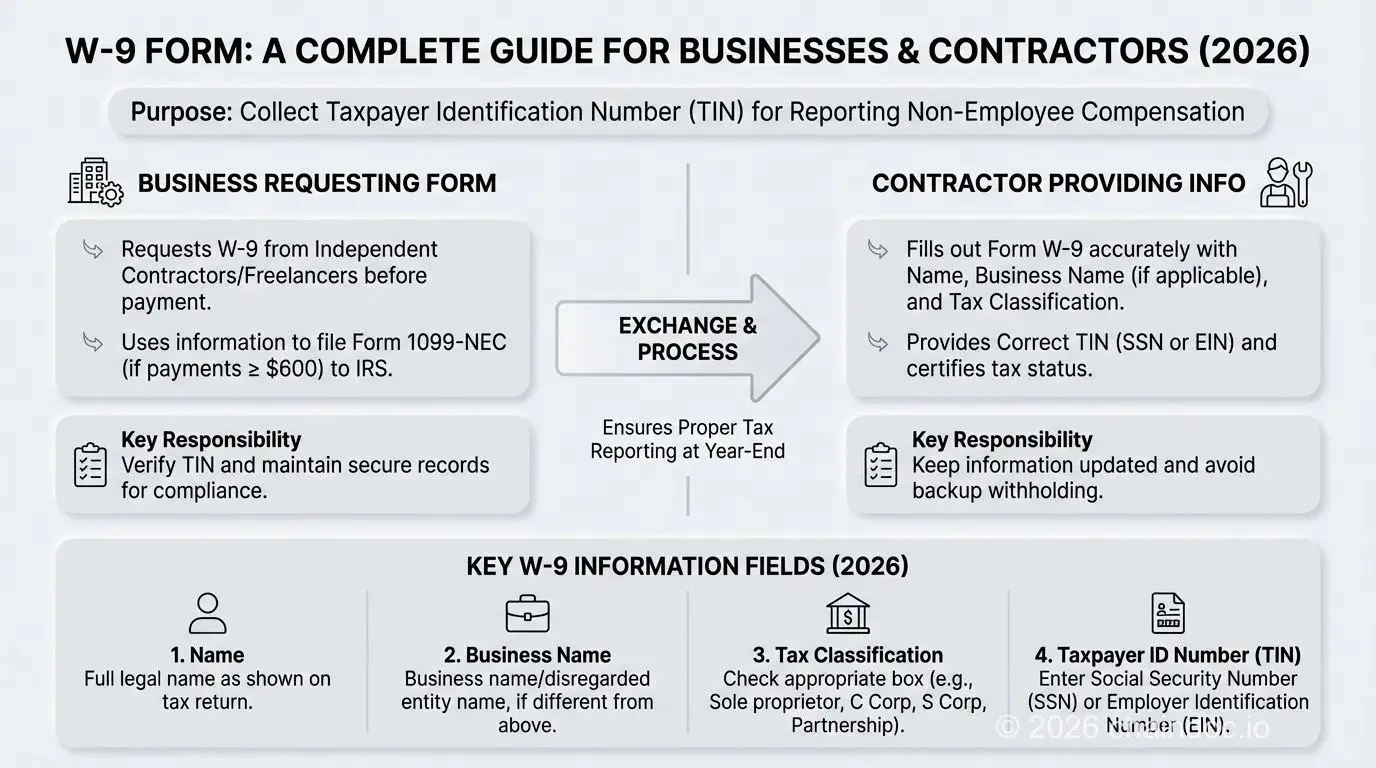
W-9 form workflow: a visual guide for businesses and contractors managing contractor onboarding and IRS compliance.
Common W-9 mistakes and key differences from other forms
Errors on a W-9 have real financial consequences: delayed payments, IRS penalty notices, and mandatory backup withholding. Here are the most frequent mistakes, how the W-9 differs from similar IRS forms, and what happens when something goes wrong.
W-9 vs. W-4: independent contractor vs. employee
Actually, the confusion between these two forms costs businesses real money. The IRS charges penalties of $280 per information return for filing incorrect 1099s, and backup withholding at 24% on payments to contractors with mismatched TINs can strain vendor relationships immediately. Here's how the forms actually compare:
The W-9 and W-4 serve entirely different purposes and are completed by different types of workers:
| Feature | Form W-9 | Form W-4 |
|---|---|---|
| Purpose | TIN collection for information reporting | Federal income tax withholding instructions |
| Completed by | Independent contractors and vendors | Employees only |
| Submitted to | Client / Payer (not filed with IRS) | Employer (retained on file) |
| Key data | Taxpayer Identification Number (TIN) | Filing status and withholding elections |
| Tax impact | No withholding: contractor manages own taxes | Determines payroll tax withholding amount |
W-9 vs. W-8: U.S. persons vs. non-U.S. persons
Non-U.S. individuals and foreign entities shouldn't complete a W-9. They need to provide the appropriate W-8 series form instead (W-8BEN for foreign individuals, W-8BEN-E for foreign entities). These forms certify foreign status and claim applicable treaty benefits to reduce or eliminate U.S. withholding tax. Using the wrong form creates withholding errors that are actually difficult to unwind after the fact.
Understanding backup withholding
Backup withholding is a 24% flat-rate tax deduction a payer must apply when a payee gives an incorrect or missing TIN, or when the IRS issues a specific notification requiring it. To avoid it:
- Double-check that your name and TIN on the W-9 match IRS records exactly before submitting.
- Use the IRS TIN Matching program to verify contractor TINs before processing payments.
- Respond promptly to any IRS "B Notice" (CP2100 or CP2100A) by requesting a corrected W-9 within 15 business days.
Ignoring a B Notice won't make it go away. It escalates to mandatory withholding and potential penalties of $50 per incorrect information return (up to $270 per return for intentional disregard).
Common mistakes to avoid
An invalid W-9 delays payments and creates IRS compliance risk. Watch out for these:
- Wrong name on Line 1. Line 1 must contain the legal name exactly as it appears on the payee's tax return. For sole proprietors, that's the individual's personal name; the DBA belongs on Line 2.
- Providing both an SSN and an EIN. Only one TIN is valid per entity. Sole proprietors use their SSN; corporations, partnerships, and LLCs use their EIN. Listing both creates a filing error.
- Missing signature and date. An unsigned W-9 is legally invalid. Part II must be signed and dated.
- Using an outdated form version. Always use the current IRS-issued form. An older version may be rejected.
Chaindoc provides a secure, verifiable workflow for W-9 collection and storage, from initial request to final signature, which removes the manual handling that leads to these errors.

Putting it all together: your W-9 compliance checklist
Putting it all together: your W-9 compliance checklist
The W-9 is a small form with outsized consequences when it goes wrong. The core points: it exists to enable accurate tax reporting, every field needs to match IRS records exactly, and an accurate W-9 form is the starting point of a compliant contractor relationship. Get it wrong and you're looking at backup withholding, penalty notices, and a scramble to fix records at year end.
Understanding the form is step one. The organizations that handle contractor compliance well treat W-9 collection as a secure, auditable workflow, not an email attachment. Replace fragmented file storage and unencrypted email submissions with one cohesive, verifiable system. Manage W-9s and all business agreements securely with Chaindoc. You get end-to-end encryption, verifiable audit trails for IRS compliance, and a single organized workspace for contracts, forms, and payments.
Start securing your contractor compliance process today. Understanding the contract vs agreement distinction also helps you choose the right legal instrument for every engagement.
Tags
Frequently Asked Questions
Answers to popular questions about Chaindoc and secure document workflows.